
If you’ve been researching better ways to manage leads, customer conversations, and sales follow-up, you’ve probably run into Salesforce CRM more than once.
And if you’ve caught yourself asking, what is Salesforce exactly? Fair question.
A lot of business owners hear the name before they really understand what it does. They know it has something to do with sales, contacts, and customer data. But they’re not always sure why so many companies in the USA rely on it or whether it’s something only big corporations need.
Here’s the simple version.
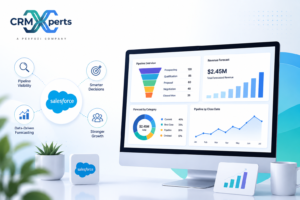
Salesforce is a cloud-based CRM platform that helps businesses keep customer information, sales activity, support requests, and reporting in one place. Instead of juggling sticky notes, spreadsheets, inboxes, and separate tools that don’t talk to each other, teams can work from a single system.
That’s the appeal. Less guessing. Less backtracking. Fewer dropped leads.
For some businesses, Salesforce starts as a better way to track sales. For others, it becomes the system that ties together sales, service, reporting, and internal processes. It can stay simple, or it can become highly tailored to fit the way your company works.
That flexibility is a big reason it has such a strong reputation.
What Is Salesforce?
In plain English, Salesforce is software that helps businesses manage relationships with prospects, customers, and existing accounts.
At the center of it is CRM, which stands for customer relationship management. That sounds technical, but the idea is pretty practical. A CRM helps you keep track of who your customers are, what they’ve bought, what conversations have happened, what stage a deal is in, and what needs to happen next.
Salesforce takes that idea and builds a much bigger system around it.
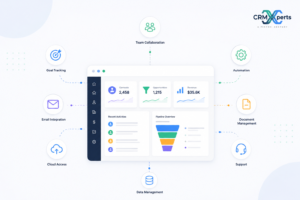
- Depending on how a company uses it, Salesforce can help with:
- Tracking New Leads
- Managing a Sales Pipeline
- Storing Customer Records
- Assigning Tasks to Team Members
- Handling Support Tickets
- Automating Repetitive Work
- Building Reports and Dashboards
- Connecting with Other Business Tools
Because it’s cloud-based, your team doesn’t need to be in one office to use it. A sales rep in Chicago, an operations manager in Phoenix, and a customer service lead in Atlanta can all work from the same live data.
That matters more than ever for U.S. businesses with remote staff, field teams, or multiple locations.
Why Businesses Keep Choosing Salesforce CRM
There are plenty of CRM tools on the market. Some are cheaper. Some are simpler. Some are fine for very small teams.
So why does Salesforce CRM stay on the shortlist for so many businesses?
Usually, it comes down to a few practical reasons.
It gives teams one source of truth
Many companies don’t realize how much time they lose to scattered information until they try to fix it.
The sales team has one version of the customer record. Support has another. Marketing has email data somewhere else. Someone in management is still relying on an Excel file that hasn’t been updated in a week.
That setup creates mistakes. It also creates frustration.
Salesforce helps pull those moving parts into one system, so your team can see customer history, open opportunities, activity, notes, and service issues without jumping between tools all day.
It works for very different types of businesses
Salesforce isn’t just for tech startups or giant enterprise brands.
In the USA, companies in construction, healthcare, manufacturing, real estate, finance, home services, and professional services all use it in different ways. A roofing company might use it to track estimates and job status. A wholesale distributor might use it to manage accounts and repeat orders. A growing consulting firm may use it to organize long sales cycles and client communications.
Same platform. Different setup.
That flexibility is why many businesses bring in crm consultation services before they build anything. The goal isn’t to force your company into somebody else’s process. It’s to shape the system around how your business actually runs.
It can grow with you
A lot of owners worry they’ll either buy too little or buy too much.
That’s a real concern.
Salesforce can start with the basics: leads, contacts, opportunities, tasks, and reports. Then, as your company grows, you can add automation, service processes, custom dashboards, integrations, or industry-specific workflows.
That’s where crm development services often become useful. A business may begin with standard features, then later need custom objects, approval flows, portals, or more complex reporting.
You don’t have to do everything at once.
It can be customized
This is a big one.
Not every business sells the same way. Not every company handles customer service the same way either. A generic setup may work for a while, but sooner or later most growing companies need the system to match real-world operations.
Salesforce allows that.
You can customize fields, page layouts, permissions, reports, automations, and workflows. If that still isn’t enough, some businesses move into custom crm development or custom crm software development to support more specific needs.
That could mean anything from special quoting steps to partner portals to custom approval chains.
What Makes Salesforce Useful Day to Day?
A lot of software sounds good during a demo. The real question is what happens on a normal Tuesday.
That’s where Salesforce either earns its keep or doesn’t.
Sales pipeline tracking
This is one of the most common reasons businesses start using Salesforce.
Your team can see where each lead stands, what actions have happened, who owns the account, and what should happen next. Managers can spot bottlenecks. Owners can look at forecasts without chasing people for updates.
It sounds basic. It’s not. Clean pipeline visibility can change how a sales team operates.
Customer service management
Once a deal closes, the work isn’t over.
Support teams often need a better way to manage customer questions, service issues, escalations, and follow-ups. Salesforce can help organize those interactions so requests don’t get buried in email threads or passed around without accountability.
For companies that care about response times and customer retention, that structure matters.
Automation
Small repetitive tasks eat time faster than most owners realize.
Assigning leads. Sending reminders. Updating statuses. Routing service requests. Creating follow-up tasks. Chasing approvals.
Salesforce can handle much of that through crm automation services, which helps teams spend less time on admin work and more time on actual selling or service.
Reporting that people can actually use
Most business owners don’t want more reports. They want clearer answers.
How many new leads came in this month? Which rep is converting best? Where are deals getting stuck? Which service issues are taking too long to resolve?
Salesforce makes those questions easier to answer. And for businesses that need deeper reporting, crm analytics reporting services can turn raw CRM data into something decision-makers can actually use.
Integration with other systems
Very few businesses run on one tool alone.
You may still use accounting software, marketing platforms, e-signature apps, internal communication tools, or inventory systems. Salesforce can connect with many of those tools, which helps cut down on duplicate entry and inconsistent records.
That’s one reason companies look for a crm software development company with experience handling system connections and workflow design, not just basic setup.
How U.S. Businesses Use Salesforce in Real Life
The practical use cases matter more than the buzzwords.
Here are a few common examples.
A small business in Texas might use Salesforce to capture website leads, assign them to sales reps, and make sure every inquiry gets a follow-up within 24 hours.
A multi-location home services company in the Southeast may use it to keep customer records, track appointments, manage complaints, and flag upsell opportunities.
A B2B manufacturer in the Midwest might use Salesforce to manage long sales cycles with multiple decision-makers, product quotes, and account histories.
A healthcare-related business may use it to organize service requests, communication logs, and internal workflows while keeping teams aligned across departments.
In each case, the software itself isn’t the whole story. The setup matters just as much.
That’s why businesses often look into crm system development services or crm software development services once they realize they need more than a generic configuration.
Is Salesforce Right for Every Business?
No, and that’s the honest answer.
If your company has a very short sales cycle, only one person managing leads, and almost no need for reporting or automation, a smaller CRM may be enough for now.
But Salesforce tends to make sense if you’re dealing with problems like these:
- Leads Slipping Through the Cracks
- Customer Data Living in Too Many Places
- No Clear Visibility into the Pipeline
- Inconsistent Follow-Up from Sales Reps
- Reporting That Takes Too Long to Pull Together
- Manual Tasks Slowing Down the Team
- Growth That Your Current Tools Can’t Support
That’s usually the turning point. A business owner realizes the issue isn’t just “we need software.” The issue is “we need a better system.”
Why Setup Matters More Than People Expect
Here’s where some projects go sideways.
A business buys Salesforce and assumes the software itself will fix bad process habits. It won’t.
If your stages are unclear, your data is messy, your handoffs are inconsistent, and nobody agrees on what should be tracked, the CRM will reflect that confusion. It won’t clean it up on its own.
A good implementation starts with structure. What needs to be tracked? Who needs access? What should happen automatically? Which reports actually matter? What steps do sales and service teams follow in real life?
That’s why many businesses work with specialists like CRMxperts. A thoughtful rollout can save a lot of frustration later, especially if your team needs customization, automation, reporting, or integrations tied to real business goals.
Frequently Asked Questions
Is Salesforce only for large companies?
No. Large companies use it, but so do small and midsize businesses across the USA. The difference is in how it’s set up. A lean sales team might need only core CRM features, while a larger company may need more advanced workflows, reporting, and department-specific tools.
How much does Salesforce cost?
The cost depends on the products, features, number of users, and level of customization. Subscription pricing is only part of the picture. Businesses should also think about implementation, training, support, and any development work they may need.
Can Salesforce be customized for my industry?
Yes. That’s one of the biggest reasons companies choose it. Salesforce can be tailored for industries like healthcare, real estate, professional services, construction, manufacturing, and finance. The level of customization depends on how specific your process is.
Does Salesforce replace all of my other business software?
Usually not all of it. In many cases, Salesforce becomes the central CRM while other tools still handle accounting, ERP, marketing, or e-commerce. The goal is often to connect systems more effectively, not necessarily replace every platform you already use.
How long does implementation usually take?
It varies. A straightforward setup may take a few weeks. A more involved build with custom workflows, data migration, integrations, and user training can take several months. The more planning done upfront, the smoother the rollout tends to be.
Why do businesses hire outside experts for Salesforce?
Because a weak setup can create just as many problems as it solves. Outside experts can help with process planning, system design, automation, reporting, data migration, and user adoption. That usually leads to a cleaner build and better long-term use.
Final Thoughts
So, what is Salesforce?
It’s a CRM platform that helps businesses organize customer information, track sales activity, improve follow-up, automate routine work, and get clearer reporting from one system.
And why is it so widely used?
Because it solves real business problems. It helps teams stay organized. It gives owners better visibility. It supports growth without forcing every company into the same mold.
For businesses that want more than a basic out-of-the-box setup, the right planning makes all the difference. If you’re considering Salesforce and want a system built around how your business actually operates, CRMxperts can help you map it out and make it practical.

CRM implementation specialist at CRM Xperts, working with Zoho and Salesforce ecosystems to help businesses get more from their CRM investment.